This is a very common question where the answer is whatever your organisation decides it is.
The single most important thing about whether it is a Lead or an Opportunity is to make it a consistent definition within your organisation and then implement it. This will avoid confusion and a platform for managing and reporting on sales that is consistent and understood by all, especially your sales team.
Let’s start with some commonly agreed definitions.
A Lead is a person or organisation that has expressed an interest in a goods or service that you are selling.
An Opportunity is a potential customer that is highly likely to purchase a goods or service that you are selling.
Most organisations have a Customer Relationship Managment (CRM) application that is used to manage their sales process.
For the purpose of this discussion, I will use Microsoft Dynamics 365 CRM to further explain Leads and Opportunities within the context of managing sales.
In Microsoft Dynamics 365 CRM, there is a list of Leads and a list of Opportunities that are created and maintained by the Sales and Marketing teams within an organisation.
A Lead in Microsoft Dynamics 365 CRM needs to be qualified and is not yet a potential customer. That is, the contact details for a Lead are not yet stored as a Contact and/or Account record.
When Lead is qualified, Microsoft Dynamics 365 CRM automatically creates an Opportunity record, an Account record that is linked to the Opportunity record and finally a Contact record that is linked to both the Account record and the Opportunity record.
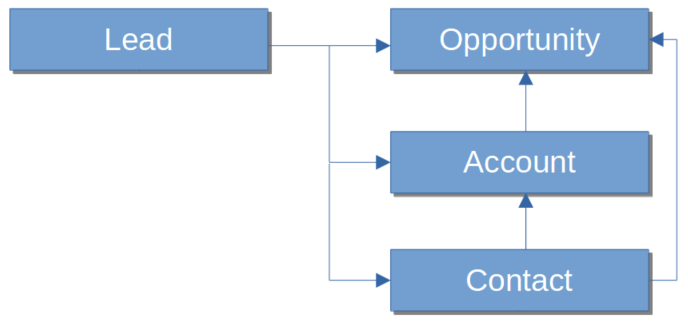
The way in which Microsoft Dynamics 365 CRM manages Leads and Opportunities is consistent with the two definitions stated above.
Given that a Lead has only expressed an interest in a goods or services that you are selling, a Contact and/or Account record does not yet exist in Microsoft Dynamics 365 CRM. Only the Lead record contains the contact information and details of their interest to purchase.
Once a Lead has been engaged, typically via a meeting or phone call, if they are not interested in the goods and service that you provide, then the Lead is disqualified and the record closed and deactivated in Microsoft Dynamics 365 CRM.
If the Lead is interested in the goods and service that you provide, they will typically request a proposal or a quote. In its simplest form, this is the basic qualification criteria for a Lead. Upon qualifying the Lead in Microsoft Dynamics 365 CRM, there will be a set of opportunity, account and contact records that represent the potential customer and potential sales for your goods or service.
Now having provided some clarity about Leads and Opportunities, there is one more concept that whilst it has been around for a very long time, it is now starting to be discussed at the same time as Leads and Opportunities, and that is Prospect.
A Prospect is a potential customer who satisfies your sales qualification criteria.
You may recall above where I mentioned the trigger for a qualified Lead is where the person requests a proposal or quote. What led to this request is the preceding conversation that typically takes the following path.
- You have a meeting in person or via a phone call
- The Lead provide details of their requirements
- If the Lead’s requirements can be satisfied by the goods and services that you are selling, you provide details to the Lead of your offerings
- If the Lead in interested, they will request a proposal or quote.
Note that a commonly agreed best practice in sales is to directly ask the Lead about their available budget, expected timeframe for delivery and if they are the decision maker. In certain circumstances the Lead provides some or all of this information without being asked. There may be occasion where asking these questions will jeopardise the sales process from progressing further. Your organisation needs to decide whether asking these questions needs to form the basis of the qualification criteria, but it is strongly recommended that they are asked as this may save lost effort in preparing a proposal only to have it rejected when you later find out their available budget was insufficient to deliver your goods and/or services.
Hence, the concept of a Prospect is between a Lead and an Opportunity and most comfortably sits at the final stages of qualifying the Lead. In my opinion, the definition is a bit flexible and depends on how your organisation wants to implement it.
In Microsoft Dynamics 365 CRM, the concept of a Prospect isn’t directly supported but entering a prospect as a Lead is probably the best thing to do.
In summary, having an agreed understanding of what a Lead is and what an Opportunity is will go a long way to supporting a robust and productive sales process in your organisation.
It depends on the corporate application your organisation uses to manage the sales process as to how you define and manage Leads and Opportunities.
If you are using, or intend to use, Microsoft Dynamics 365 CRM then aligning to the definition of Leads and Opportunities provided in this article would be a good way to go as much of this functionality as provided by Microsoft Dynamics 365 CRM is out of the box.
 Atia Solutions