The purpose of this article is to provide a high level understanding of Power BI Licensing with all pricing being displayed in Australian Dollars (AUD).
There are a number of options that you can choose to use Power BI but lets start with the following three options.
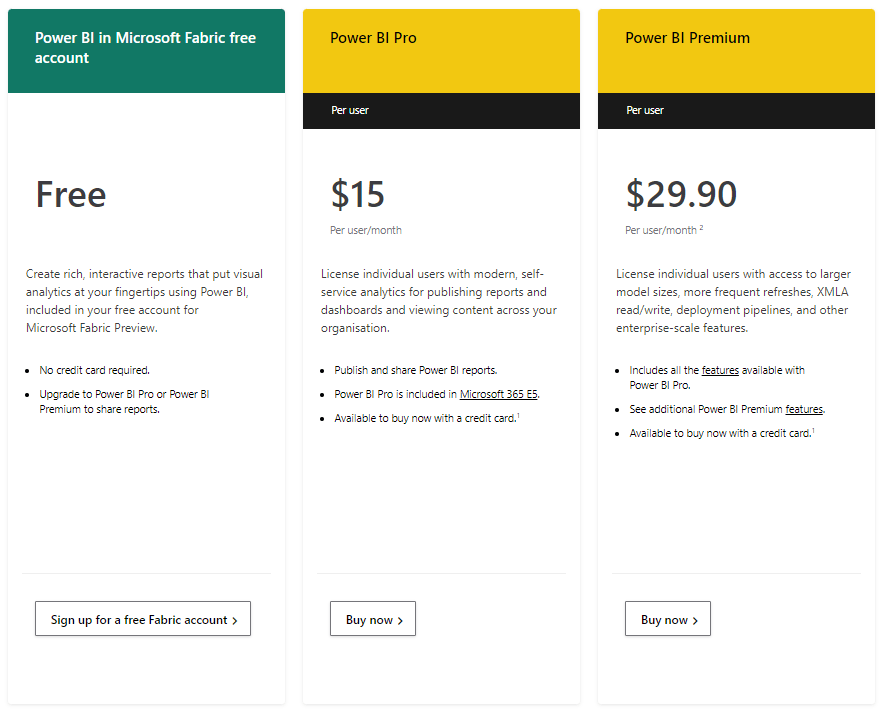
Power BI Free
When you sign up for the Power BI Free option, you can use Power BI Desktop to create reports and then publish them to a workspace that is in cloud known as the Power BI Service.
The Power BI Service is the foundation for all Power BI Deployment scenarios where the functions and features that are available to you as a user increase depending on which licensing option you have chosen.
With Power BI Free, you a single workspace to which you can publish one or more reports. However, if you want to share your reports with other Power BI Users, you won’t be able to do this.
To share your reports with other Power BI Users, you will need a Power BI Pro license and the Power BI User with whom you are sharing your reports will also need Power BI Pro license.
You may ask what is the point of Power BI Free and essentially it is an entry level capability allowing anyone who is interested in learning more about Power BI to access the Power BI Desktop which is where you create the reports and become familiar with the Power BI Cloud Service as a collaboration platform for Business Intelligence and Data Analytics.
One final note about Power BI Free is that you get only one default Workspace for publishing you reports and as previously stated, it can only be access by you.
Power BI Pro
The main advantages of a Power BI Pro license over a Power BI Free license is that you can share your reports to other Power BI Pro users and also you have the ability to create multiple Workspaces to which many reports can be deployed. This is the principle feature that allows collaboration of Business Intelligence and Data Analytics based information between between users within an organisation.
Other advantages of Power BI Pro over Power BI Free include:
- Model Memory Limit up to 1GB
- Maximum Power BI Native Storage up to 10GB
- Refresh for Power BI Datasets up 8 per day.
Note that prior to the latest Power BI Licensing and Pricing updates, Power BI Free had similar specifications to that of Power BI Pro with regards to Model Memory Limit, Maximum Memory Storage and Dataset Refresh. Online information regarding the above specifications is unclear so we can assume for now that all or part provisioning of the Power BI Pro specifications is being made available.
Hence, sharing reports and being able to create multiple workspaces is the definite advantage of Power BI Pro over Power BI Free.
Note however that a Power BI Pro user cannot share reports to Power BI Free users. They can only share reports to other Power BI Pro and/or Power BI Premium users.
Power BI Premium
There are two types of Power BI Premium licenses which are:
- Power BI Premium Per User (PPU)
- Power BI Premium Per Capacity.
A Power BI Premium Per User license includes all the features provided by the Power BI Pro license and also has the following additional features:
- Model Memory Limit up to 10GB
- Maximum Power BI Native Storage up to 100TB
- Refresh for Power BI Datasets up 48 per day
- AI capabilities (AutoML, Impact Analysis, Cognitive Services)
- Advanced dataflows features, such as DirectQuery
- Deployment Pipelines
- XMLA endpoint connectivity
- Enhanced automatic page refresh
- Incremental refresh
- Bring Your Own Key (BYOK) (when it’s enabled across the entire tenant).
A Power BI Premium Per Capacity license allows to to purchase dedicated server and memory capacity where your organisation is the sole user of this capacity. That is, you are not sharing this capacity with any other organisation.
The licensing options available for Power BI Premium Per Capacity are shown below.
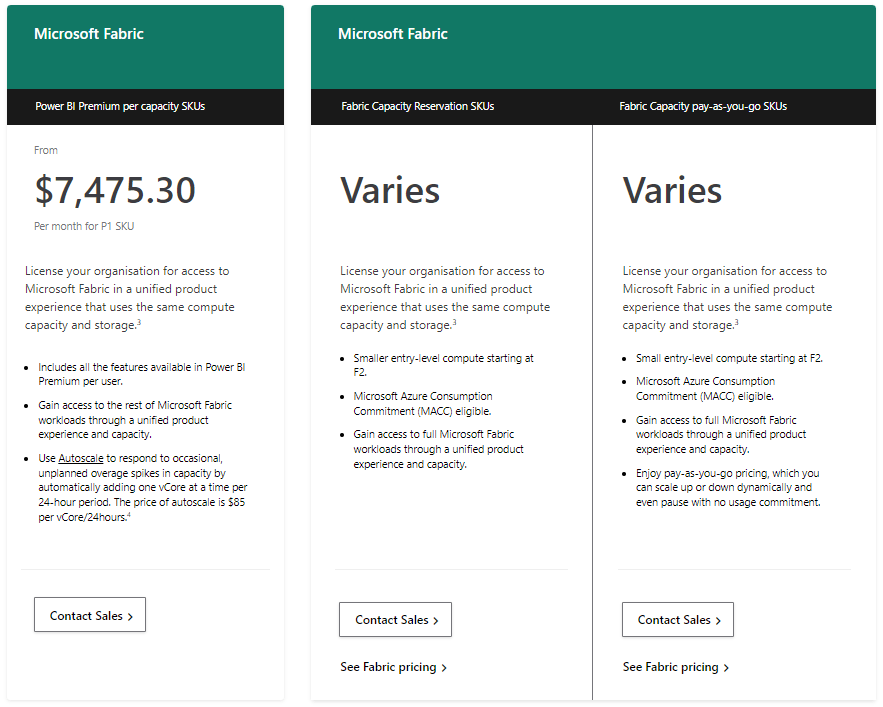
A Power BI Premium Per Capacity license includes all the features provided by the Power BI Premium Per User license and also has the following additional features:
- Multi-Geo support
- Unlimited distribution
- Power BI reports on-premises
- Bring Your Own Key (BYOK).
From a report sharing capability point of view, the following functionality is supported:
- Reports shared from a Workspace deployed via a Power BI Premium Per Capacity license can be viewed by all Power BI end users including those that have a Power BI Free license. Note that the end user that creates, publishes and shares the report from a Workspace deployed via Power BI Premium Per Capacity still needs either a Power BI Pro or Power BI Premium license.
- Power BI Pro users can share reports to Power BI Premium users but Power BI Premium users can’t share reports to Power BI Pro users if the Workspace created by the Power BI Premium user is a Premium Workspace. If the Power BI Premium user creates a Pro Workspace then they can share those reports to Power BI Pro users.
So when it does it become cost effective to purchase a Power BI Premium Per Capacity license?
When the user count is 500 based on the cost of a Power BI Pro licence.
Using the above pricing which is in Australian Dollars (AUD), the calculation is shown below.
Power BI Premium Per Capacity ($7475.30) / Power BI Pro ($15) = 499 Users (approx.)
The mechanism that makes a user count of greater than 500 the cut off point to reduce the cost of your Power BI Deployment is that you can keep the number of the Power BI Pro and/or Power BI Premium to a minimum as these are the end users that will be creating, publishing and sharing reports. If the largest number of end users within you organisation are only viewing reports, then all they need is the Power BI Free license.
Note that the cost of the Power BI Premium Per Capacity license shown above is for the base P1 SKU. Microsoft provide 4 additional SKUs where the server and memory capacity increases and for each SKU the cost is double to that of the previous SKU.
For more detailed information on Power BI Licensing and Deployment, refer to the following Microsoft online documentation:
 Atia Solutions