Have you ever had your Dynamics 365 CRM or Model Driven PowerApps instance run slow?
Well, the cause could be a latency or bandwidth issue between your web browser and the Dynamics 365 CRM or Model Driven PowerApps server.
There is a very simple way to check the latency by using the following URL.
https://<Your CRM Address>/tools/diagnostics/diag.aspxYour web browser will display a screen similar to the following.
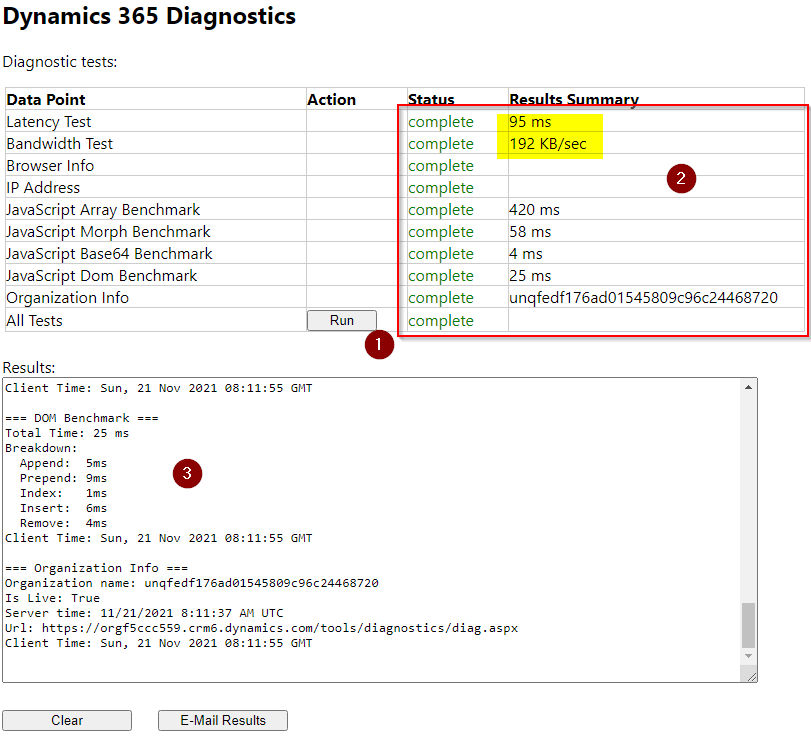
Pressing the Run button will display the results for a series of tests, two of which are Latency and Bandwidth.
The full details of the tests completed can then be viewed in the Results window pane.
Next time your Dynamics 365 CRM or Model Driven PowerApps instance is running slow, run the above test and compare the results with those when the response is normal.
 Atia Solutions